
💾 Download EaseUS Data Recovery Wizard 12.9 – Recover Lost or Deleted Files (Free & Trial Version)
📝 Overview
EaseUS Data Recovery Wizard 12.9 is a powerful and trusted data recovery software that helps you restore lost, deleted, or formatted files from your PC, laptop, hard drives, USB drives, memory cards, and external devices.
Developed by EaseUS, this version offers a simple yet highly effective way to recover photos, videos, documents, and more — even after accidental deletion or partition loss.
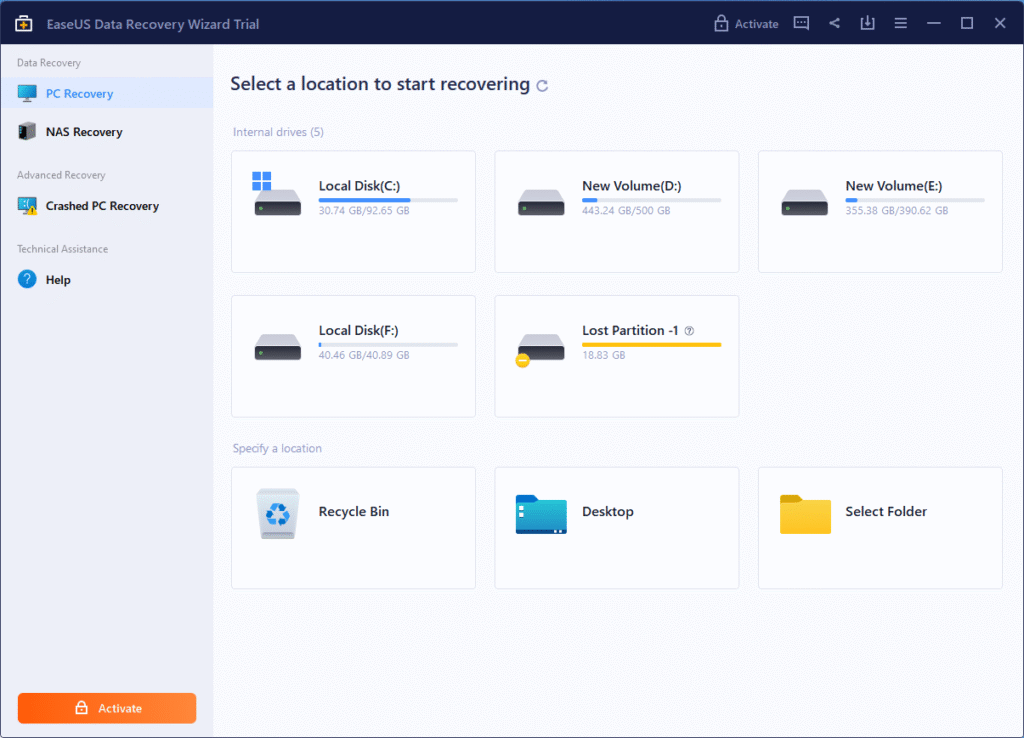
With its intuitive interface, advanced scanning technology, and high recovery success rate, EaseUS Data Recovery Wizard 12.9 is the perfect solution for both home users and professionals who need quick and secure file restoration.
⚙️ Key Features
- 🧠 Quick & Deep Scan: Automatically detects and recovers lost files efficiently.
- 🗂️ Supports All File Types: Recover photos, videos, audio, emails, and documents.
- 💽 Partition Recovery: Restore data from deleted, formatted, or corrupted partitions.
- ⚡ High-Speed Recovery: Fast scanning with accurate results.
- 🔍 Preview Before Recovery: View files before restoring to ensure data accuracy.
- 💾 External Device Support: Works with USB drives, SD cards, and external hard disks.
- 🧩 Formatted Drive Recovery: Retrieve data from accidentally formatted drives.
- 🔒 Safe & Secure: 100% clean software with no data overwriting.
- 🛠️ RAW Drive Recovery: Recovers data even from inaccessible or unrecognized drives.
- 💡 Easy Interface: One-click recovery with a clean, step-by-step workflow.
💻 System Requirements
Operating System: Windows XP / Vista / 7 / 8 / 10 / 11 (32-bit & 64-bit)
Processor: Intel Pentium or AMD equivalent
Memory (RAM): Minimum 2 GB (4 GB recommended)
Storage: 200 MB of free space for installation
Display: 1024×768 resolution or higher
Additional Requirement: Internet connection for activation and updates
🔑 License Information
Version: EaseUS Data Recovery Wizard 12.9
License Type: Free & Trial Version (Up to 2GB free recovery)
Developer: EaseUS Software Co., Ltd.
⚠️ The free version allows up to 2GB of data recovery. Upgrade to the Pro version for unlimited recovery and technical support.
📥 Download & Installation Steps
- Click the “Download” button below to get the EaseUS Data Recovery Wizard 12.9 setup.
- Run the installer and follow the on-screen instructions.
- Launch the software and choose the drive or folder to scan.
- Wait for the scan to complete and preview the recoverable files.
- Select files and click “Recover” to restore your data safely.
💰 Buy Full Version (Affiliate Link)
👉 Get EaseUS Data Recovery Wizard Professional – Official Store
Unlock unlimited recovery, deep scan features, and lifetime technical support.
⚠️ Disclaimer
We provide the official trial version of EaseUS Data Recovery Wizard 12.9 for educational and testing purposes.
All rights belong to EaseUS Software Co., Ltd.
Always purchase a genuine license for full and legal usage.
Password : www.softfiles.in









